Pages

Friday, 19 July 2013

Renault DC Duster Pictures/Renault DC Duster Interior or exterior Design/Renault DC Price In India


DC has just gone ballistic redressing Renault's best selling compact SUV model the Duster in the most opulent way possible. A matt finish exterior and an almost prototype like styling treatment for the front and rear end makes the DC Duster now look like the preferred mode of transportation for travelling through time. Interior refurbishments include the use of fine leathers and wood paneling, not to mention the very inviting captain seats. Price starting at 3.49 Lakh


Renault DC Duster front end styling


Renault DC Duster rear profile


Renault DC Duster cabin


Renault DC Duster captain seats


Renault DC Duster


Renault DC Duster multi function switch panel


Renault DC Duster captain seats

Audi TT Coupe Pictures/Audi TT Coupe interior and exterior design


The current Audi TT Coupe gets subtle updates which add to the overall demeanour. Subtle changes to the interior and exterior design have been employed to keep the revised model looking fresh


Front bumpers feature larger air inlets, fog lights are set in chrome rings and the front grille and headlights have also been redesigned with twelve white light-emitting diodes serving as the daytime running lights


At the rear revised diffuser designs and exhaust pipes make the model nearly two centimetres longer while the width and height remain the same


Lightweight aluminium is used from the front of the car till the B-pillar with steel panels used at the rear


The layout inside the TT is excellent, with controls and displays familiar to an Audi driver but superb to use


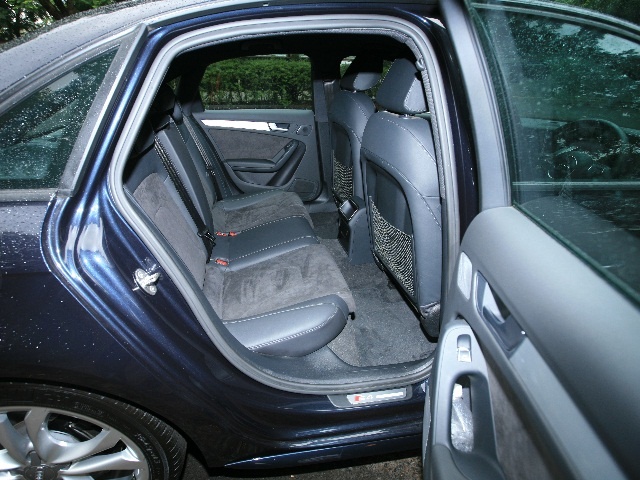
While the driving position is spot on and just eggs you drive harder, the rear seats are just about adequate for kids


The steering is an absolute chatterbox and full of feedback which makes going into corners a complete delight


Transferring the power to all four wheels is an S tronic dual clutch transmission which enables some lightening quick shifts


Finding its way in the engine bay now is a 2.0 TFSI engine


At 48.36 lakh (ex-showroom Maharashtra) the Audi TT comes across as one of the most practical sports cars out there with seating for four, very good ground clearance and even a respectable boot

Audi S4 Pictures/About Laxurious Car/Audi S4/Audi S4 Interior and exterior Pictures


Priced from Rs 45.31 lakh onwards (ex-showroom Maharashtra), the new Audi S4 is the first of the German car maker's S models to be introduced in India


The last time we heard about a 300 plus horsepower Audi model going on sale in India it was a whopping Rs 86.44 lakh; almost twice the price of what you see before you. But guess what? Not only is this one identical on the performance front, but more spacious, better looking, and almost as efficient if not slightly more than its race ready cousin, the RS5 Coupe


Powering the S4 is the 3.0 litre, 6 cylinder TFSI engine that pumps out a solid 337.6PS of power and generates 440Nm of torque. The S4 accelerates from zero to 100 km/h in just 5.0 seconds and achieves an electronically limited maximum speed of 250 km/h. As per ARAI tests, the new Audi S4 will sip just about a litre of petrol for every 10.34 kms travelled


For achieving its desired performance Audi has equipped the S4 with a sport suspension that lowers the vehicle body by 20 millimeters (0.79 in). Also factored is a high-performance brake system that provides powerful deceleration to the car’s 18 inches wheels


The most noteworthy mentions include a leather multifunction sport steering wheel, sporty cool black interior surfaces and imposing S4 badges on the front, rear and interior of the vehicle. Also, just like we saw on the older RS5 Coupe model, the housings of the exterior mirrors on the S4 also shine with an aluminum-look finish


Superior performance and upscale luxury have always been the USPs’ of Audi models globally, but with the launch of the S4, Audi enthusiasts in India who so far have been smitten by the mere look and feel of the recently launched next-gen A4 model now have a faster and a far more flamboyant trim to pick from


How to Create Animated GIF/Create a free Animated GIF/create a video file from an animated GIF image/animated GIF images


Do you want to Create a free Animated GIF than QGifer is a great solution which can easily create a video file from an animated GIF image. It also includes the option to customize the overlaying of images and text.
qgifer Review 500x303 How to Create Animated GIF
QGifer tools available to come up with funny, animated GIF images, but few offer the flexibility and ease of use for more complicated projects in a short amount of time.
QGifer is a new tool designed specifically for authoring motion pictures and video files is created.
Brief interface and functions are placed within easy reach. Many software screen to show video (Supported formats AVI, MP4, MPG and OGV files), a region that also doubles as a previewer is.
In the left part of the main window, a toolbox with various functions to speed up various aspects of the project there. This includes setting the resolution manually set the first and last frame GIF, made some color corrections and edge definition.
However, many of these tricks can be performed directly on the video window, which some users may find easier.
Under the “Filters” section handler for color correction, saturation and brightness there. You can preview the changes instantly reflected enables, but on how it affects lubricant drawn. Alternative is to change, and then activate the preview.
QGifer allows to add a blur effect to the image (blurred average) also provides.
Filters and effects aside, the most important aspect of the program is to define the frame of this project. It can be easily selected from the tool bar at the top of the interface, or you can drag the slider in the bar area to be defined. Another method is to manually input the value in the “Properties” panel output.
qgifer 500x316 How to Create Animated GIF
Options in the context menu for the text box, referring to its size and position on the front or back of the frame. Additionally, you can choose to interpolate the key decisions.
While this may be the way you want to be able to manipulate objects, but should not be too difficult.
Power users can program all functions accessible through keyboard shortcuts.
QGifer is also a function relies on third-party software packages are. This optimization method, which requires ImageMagick to run on the system to be installed.
However, no link to download the program or any hint that it may lead to recovery exist.
Despite being in beta stage of development, QGifer does not show signs of malfunctioning. It can be easily managed by the average user and even a beginner. If you already know the result you want to achieve, trying to reach its true shape and detail.
Try the QGifer Software and let us know your views in the below comments.

Free Image Editing Software/Free Image Hosting/Picasa image viewer/Photoscape/Paint.NET/Be Funky Free Image Editing


If you can’t afford to purchase Image Editing Software, don’t worry, then are still plenty of free image editing software available on the web which will solve your intend. Here are the best and the top Free Image Editing Software for newbies with the advanced features:

1. Picasa:
Picasa 500x361 Free Image Editing Software
Picasa
Picasa is an image viewer, editing software and an integrated photo sharing tool owned by GoogleIt offers basic editing features like red eye reduction, cropping, texting, highlight, cross process etc. Picasa supports Google’s WebP image, JPG format and raw image format but doesn’t support PNG format.
You can edit the raw format and save it in JPEG format without any change to raw original file. It also provides a search bar which enables the user to locate its file by typing filename, folder name or other metadata. Picasa is available for all operation system. The latest version of Picasa is 3.9.

Photoscape Free Image Editing Software
Photoscape
Photoscape is an easy and fun loving graphic free image editing software developed by MOOII Tech. It provides an interface to perform function likes color enhancement, GIF animation, frames, sharpness, auto-level and contrast and many more. It is only available for Windows based operating system. The latest version of Photoscape is 3.6.3.

3. Paint.NET:
Paintnet 500x369 Free Image Editing Software
Paintnet
Paint.Net is a Windows based free raster graphic editor developed by dotPDN, LLC. A raster graphics editor is a computer program that allows users to paint and edit pictures and save them in JPEG, PNG, GIF and TIFF format. Some of the features include sharpening, blurring, RGV and HSB effect, different fonts and so on.

4. Be Funky:
Be Funky 500x395 Free Image Editing Software
Be Funky
Be Funky is the renowned online free image editing Software developed by Befunky, Inc. Be Funky provides a variety of features like pop art, Cartoonizer, vintage colors, tilt shift, pin hole, cross process and many more.  The website allows user all sorts of frames, goodies and borders. The application is also available in mobile platforms (only for android and iOS users).

5. GIMP:
GIMP 500x302 Free Image Editing Software
GIMP
The GNU Image Manipulation Program: GIMP is an open source free image editing Software intricate launched by GIMP Development Team. GIMP provides features like resizing, cropping, photomontage, and more specialized tasks. Photomontage is a process of cutting then joining it with another photograph.
This is the feature which you usually don’t find in free editing tools. There are two extensions available for GIMP. First is, GIMP Animation Package, for animation capabilities and the other is, GIMP Paint Studio, for collection of brushes.